What to do when an applicant calls to say they didn't receive the confirmation email.
When an applicant submits their application, they should receive a confirmation email. The contents of the email are determined by the district from Setup -> Edit Application Setups -> Finish Msg.
Here's what to do:
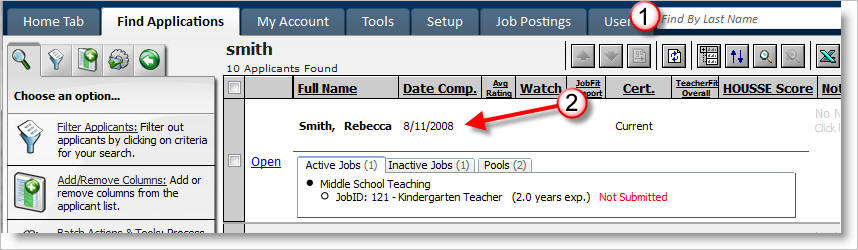
1) Log into the system and look them them up by last name.
2) Review their "Date Comp." (date completed) field and tell them that their application was received on the respective date. If they claim they submitted their application on a different date inform them that this date is the last date they submitted their application, not the last date they accessed or modified their application. If they want to update this date to today's date, tell them to resubmit their application by logging into it and clicking the "finish and submit application" button at the bottom of the window.
3) Inform the candidate that the email is an automated email from "mailbot@generalasp.com." It may have been blocked by their email's spam blocker.
4) If you require any further information from the candidate direct them to send it in. Otherwise, tell them no further action is required by them.
5) Done!